Documentations

5 Minutes

Admin

1,405

08/30/2024

Documentations
5 Minutes
Admin
1,405
08/30/2024


Do this to understand which criteria have been met and which criteria are still failed to fix and re-check by scrolling down to the all test cases section to start checking each test case to see if it has completed or failed or is in one of two statuses that need to be noted, including:
- Passed
- Passed
- Failed
- Blocked
- Skip
- Not run
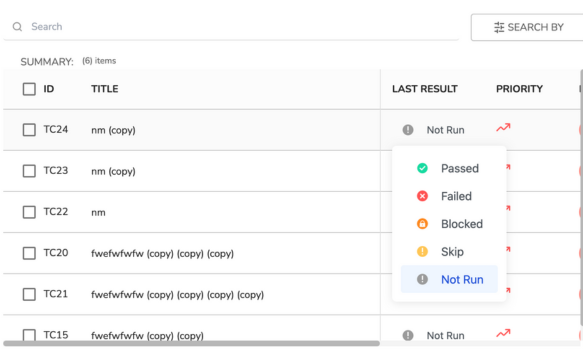
Users can update the actual results for test cases that do not meet the requirements by double-clicking on the test case and updating it in the "Actual Result" section.
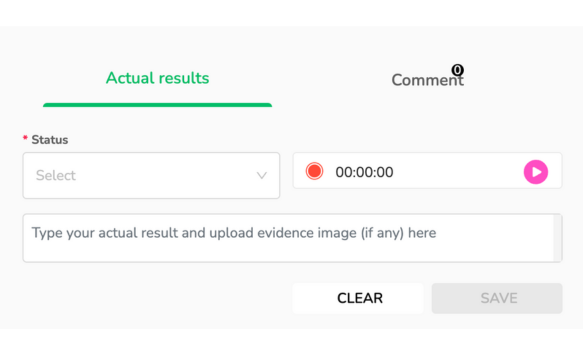
In this, you can update the status as: Passed, Failed, Blocked, Skip, and Not run. You can also turn on the time tracking feature to measure on how much of time you have each case.
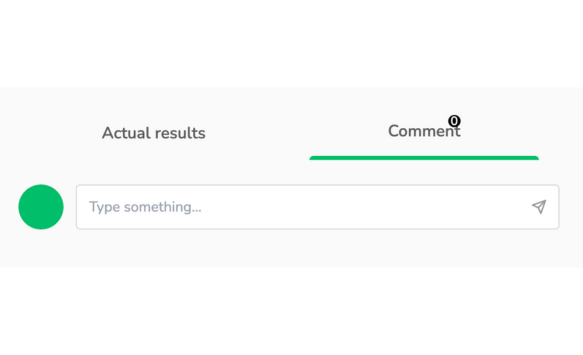
It’s possible to add a comment for both the entire test case execution and every single test step.

Documentations
3Minutes
QAlify is a robust test management tool that streamlines test run management, allowing teams to efficiently plan, execute, and track their testing processes. With QAlify, users can easily schedule and manage test runs, monitor real-time progress, and track results across different test cases and environments....
Admin
1,566
08/29/2024

Documentations
5Minutes
QAlify streamlines the testing process by offering robust report generation features, enabling teams to create detailed and customized test reports with ease. ...
Admin
1,614
08/30/2024

Documentations
5Minutes
QAlify is a test management tool that helps users easily create test cases by manual or with Generative AI with simple prompts and clicks. The tool is capable of covering all aspects of testing, from testing a specific function, a feature, or a complex set of tests....
Admin
1,812
08/30/2024

